
Last Updated: 30th November 2024
Applies to:
- Solar Installer users
- Enterprise users
What You Need To Do:
After the opportunity has been created click on Battery Technology tab in the top navigation bar.
Note: If the proposal is shared be sure to un-share to enable editing.
Note: Before you start, make sure you are within an opportunity (not on the home screen). If you're not sure how to create an opportunity, check out our article: Creating a proposal - Start to Finish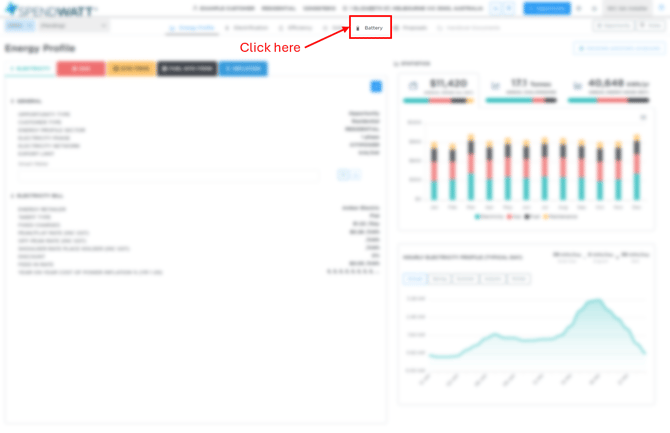
Then Follow The Simple Steps Below:
- If the opportunity was automatically generated jump to step 4 - otherwise continue below:
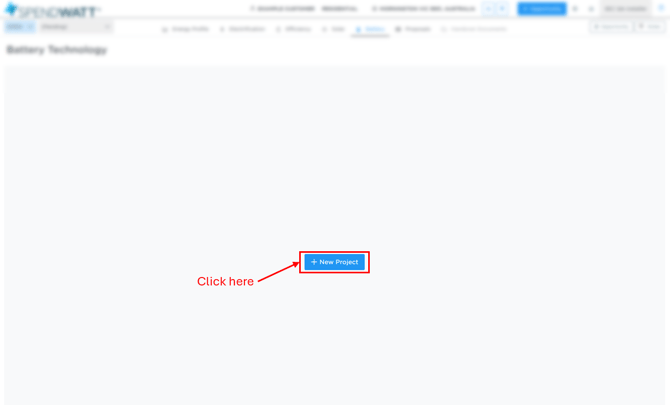
- Click + New Project
- Select the Manufacturer then click Create
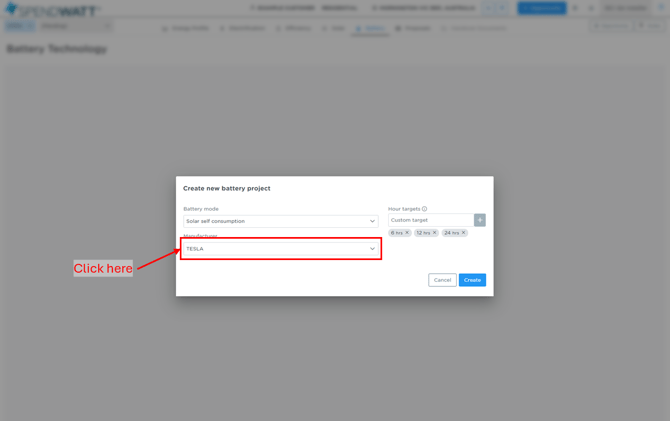
Note: If you don't see the manufacturer you're looking for, first add the product/s you want to use here - At the project options screen that loads you can then:
- Click on the option line to check out the budget (To learn how to use the budgets click here) or,
- Click on the dropdown next to Option [#] to i) see more detail about the auto selected battery product and ii) select a different battery product where required
- Click on the Hour targets to control the quantity of batteries found in the budgets
Note: see the 'i' icon next to the word 'Hour targets' for an explanation of how this feature works - Click on the Indicative tick to control if the proposal is indicative (Call to action is 'Request Quote' or not changing the call to action to 'Sign & Accept Proposal'
- Click on Add, to add that option to the proposal
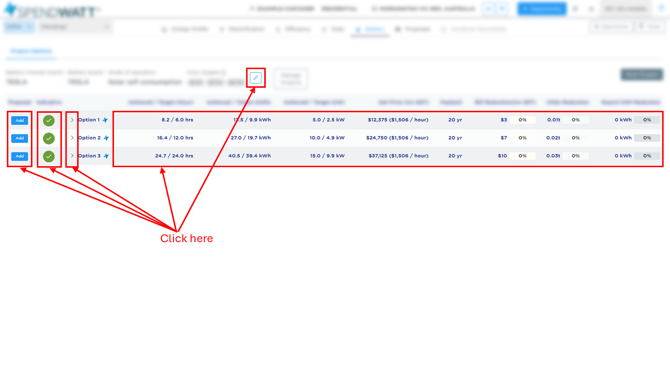
Note: To create a proposal or to view the value of retrofitting a given battery solution to a customer's existing solar all you need to do is add the desired option to the proposal and you are done. You can also see how this looks with more solar. See how to add more solar here.
Recommended articles:
- How to make custom load profiles / custom smart meter data
- Uploading smart meter data
- Customer Proposal (Overview)
- Creating a Solar Design and Proposal (Overview)
- Creating a Building Electrification Proposal (Overview)
- Creating an EV Charger Proposal (Overview)
- Creating a Vehicle Electrification Proposal (Overview)