
Problem:
When clicking “Build Proposals”:
- The proposal does not load or appears stuck, or
- The proposal loads but figures (price, savings, payback) do not reflect recent changes
Why This Happens
There are 3 common causes:
1. Missing Product or Pricing
This occurs when one or more products included in your Added Options Budgets:
- Do not exist in your Private Supplier list, or
- Do not have pricing assigned
The system cannot generate or update a proposal if required product data is missing.
2. Disabled Product in Budget
This can also be caused when a product included in the proposal has been disabled within a budget, as shown in the example below.
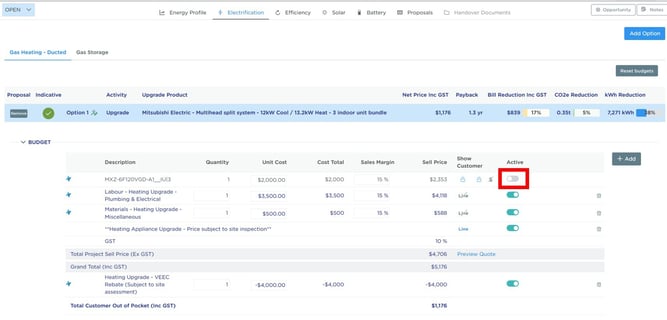
When the product is disabled in the budget, the proposal still recognises the upgrade in the summary panel, however the 3D proposal cannot render the interactive product controls.
How to Fix It
- Open the relevant budget
- Re-enable the disabled product line item
- Rebuild the proposal
Once rebuilt, the products should appear correctly within the 3D model and can be interacted with as expected.
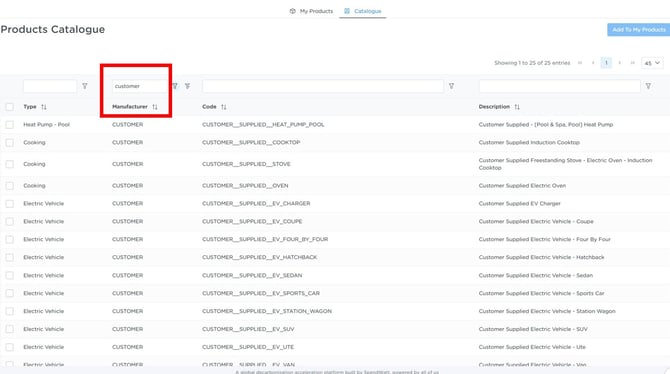
Note: If the product was intentionally disabled because it is customer supplied, you should instead:
- Add the relevant generic/customer-supplied 'product' into your Private Supplier catalogue
- Create a new proposal option using those products
This allows the proposal to display correctly in the 3D model without being tied to a specific supplied product.
3. Proposal Not Fully Rebuilding (Performance Limitation)
When multiple technologies or options are added to a proposal (typically 4–5), the system can sometimes:
- Struggle to fully rebuild the proposal
- Display outdated pricing or calculations
- Appear to load, but not reflect recent budget changes
In these cases, the proposal needs to be fully reset and rebuilt.
How to Fix It
Step 1: Check Products and Pricing
- Open the Budgets
- Review all products included in the proposal
- Ensure each product:
- Exists in your Private Supplier list
- Has pricing assigned
Step 2: Rebuild the Proposal (If Still Not Updating)
If the issue persists, follow these steps:
- Remove all technologies/options from the proposal
- Click Build Proposals (this creates a blank proposal)
- Add the technologies/options back into the proposal
- Click Build Proposal again
- Refresh the page as required until the proposal fully loads
Result
The proposal should now:
- Load correctly
- Reflect the latest pricing
- Show accurate totals and payback calculations